GraphQL is a query language for APIs that provides a more efficient, powerful, and flexible alternative to traditional REST APIs.
Combining GraphQL with Express.js, a popular Node.js web application framework, allows We to quickly set up a robust and scalable server for handling GraphQL queries and mutations.
We’ll creating a GraphQL server using Express.js.
Prerequisites
Before we start, make sure you have Node.js and npm (Node Package Manager) installed on in our machine.
Step 1: Project Initialization
Create a new directory for your project and navigate into it using your terminal.
mkdir graphql-express-server
cd graphql-express-server
Initialize a new Node.js project by running:
npm init -y
Step 2: Install Dependencies
Install the necessary packages that neccesary for creating a GraphQL server with Express:
npm install express express-graphql graphql json-server
npm install -D @types/express-graphql @types/graphql
Step 3: Create Schema file in src/graphql
Now we create schema for our scheme of graphql. Our Schema consist of schema and resolver. schema it self usualy consist of type , query and mutation . Resolver is a function or method that resolves a value for a type or field within a schema in other mean its representative of our schema.
Create schema foile in directory of src/graphql/myschema.js
const { buildSchema } = require("graphql");

// Sample user data in a JSON variable array
const products = [
  { id: 1, name: "Iphone 12", price: 19.99, category: 1 },
  { id: 2, name: "Samsung S20", price: 29.99, category: 1 },
  { id: 3, name: "Xiaomi T20", price: 9.99, category: 1 },
  { id: 4, name: "Honda Jazz", price: 49.99, category: 4 },
  { id: 5, name: "BMW E series", price: 14.99, category: 4 },
  { id: 6, name: "Clean Code Javascript", price: 39.99, category: 3 },
  {
    id: 7,
    name: "Design Pattern Javascript",
    price: 24.99,
    category: 3,
  },
  { id: 8, name: "Nike Air Max", price: 59.99, category: 2 },
  { id: 9, name: "Adidas zx", price: 34.99, category: 2 },
  { id: 10, name: "Puma x2012", price: 44.99, category: 2 },
];

const productCategories = [
  { id: 1, name: "Electronics" },
  { id: 2, name: "Fashion" },
  { id: 3, name: "Books" },
  { id: 4, name: "Automotive" },
];

// Define the GraphQL schema
const schema = buildSchema(`
  type Product {
    id: Int!
    name: String
    price: Float
    category: Category
  }
  type Category {
    id: Int!
    name: String
    products: [Product]
  }

  type Query {
    getAllProducts: [Product]
    getProduct(id: Int): Product
    getAllCategories: [Category]
    getCategory(id: Int): Category

    getAllProductCategoryInfo: [Product]
    productCategory(id:Int): Product

  }
`);

// Define resolver functions
const root = {
  // getAllProducts: () => products,
  getAllProducts: () => {
    return products.map((product) => {
      const category = productCategories.find(
        (category) => category.id === product.category
      );
      return { ...product, category };
    });
  },
  getProduct: ({ id }) => {
    const prod = products.find((val) => val.id === id);
    if (!prod) {
      return null; // or handle the case where the product is not found
    }

    const categories = productCategories.filter(
      (val) => val.id === prod.category
    );

    return { ...prod, category: categories[0] || null };
  },

  getAllCategories: () => {
    return productCategories.map((category) => {
      const categoryProducts = products.filter(
        (product) => product.category === category.id
      );
      return { ...category, products: categoryProducts };
    });
  },
  getCategory: ({ id }) => {
    const category = productCategories.find((category) => category.id === id);
    if (!category) {
      return null; // or handle the case where the category is not found
    }
    const categoryProducts = products.filter(
      (val) => val.category === category.id
    );
    return { ...category, products: categoryProducts };
  },
};

module.exports = { schema, root };
Step 3: Create Server with express JS and import schema
// server.js
import express from "express";
import { graphqlHTTP } from "express-graphql";

const app = express();
const PORT = 3000;

import { schema, root } from "./graphql/mySchema.js"; // for graphql

// Set up the GraphQL endpoint
app.use(
  "/graphql",
  graphqlHTTP({
    schema: schema,
    rootValue: root,
    graphiql: true, // Enable the GraphiQL UI for testing queries
  })
);

// Start the server
app.listen(PORT, () => {
  console.log(`GraphQL Server is running on http://localhost:${PORT}/graphql`);
});
4. Running Project
nodemon src/server.js5. Execute GraphQL with GraphiQl
Open browser and open http://localhost:9900/graphql
Now we can operate query in UI GraphiQL
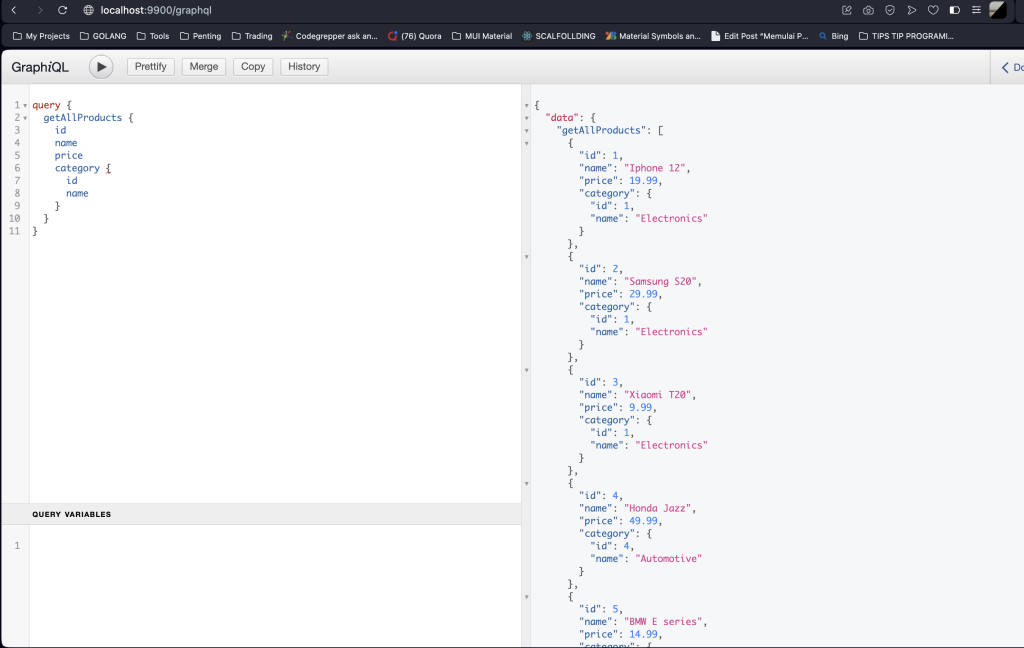
We can access all resource with some Query like below:
// query get all prodoucts
query getAllProducts {
  getAllProducts{
    id
    name
    price
  }
}

// show all products and nested category
query {
  getAllProducts {
    id
    name
    price
    category {
      id
      name
    }
  }
}

// query get detail products
query GetProduct($id: Int!) {
  getProduct(id: $id) {
    id
    name
    price
    category{
      id
      name
    }
  }
}

variables
{
  "id": 1
}


// show all categories nested products
query {
  getAllCategories {
    id
    name
    products {
      id
      name
      price
    }
  }
}

// one category nested products
query GetCategory($id: Int!) {
  getCategory(id: $id) {
    id
    name
    products {
      id
      name
      price
    }
  }
}
variables:
{
  "id": 1
}
Happy Coding!
